Before you start
- The package must be defined and active under Business › Packages.
- The member must have a record. An inactive member cannot be given a package.
Selling a package is one four-step flow: Member and Package, Dates and Price, Plan Sessions and Payment. Nothing is saved until you save on the last step.
Assign the package
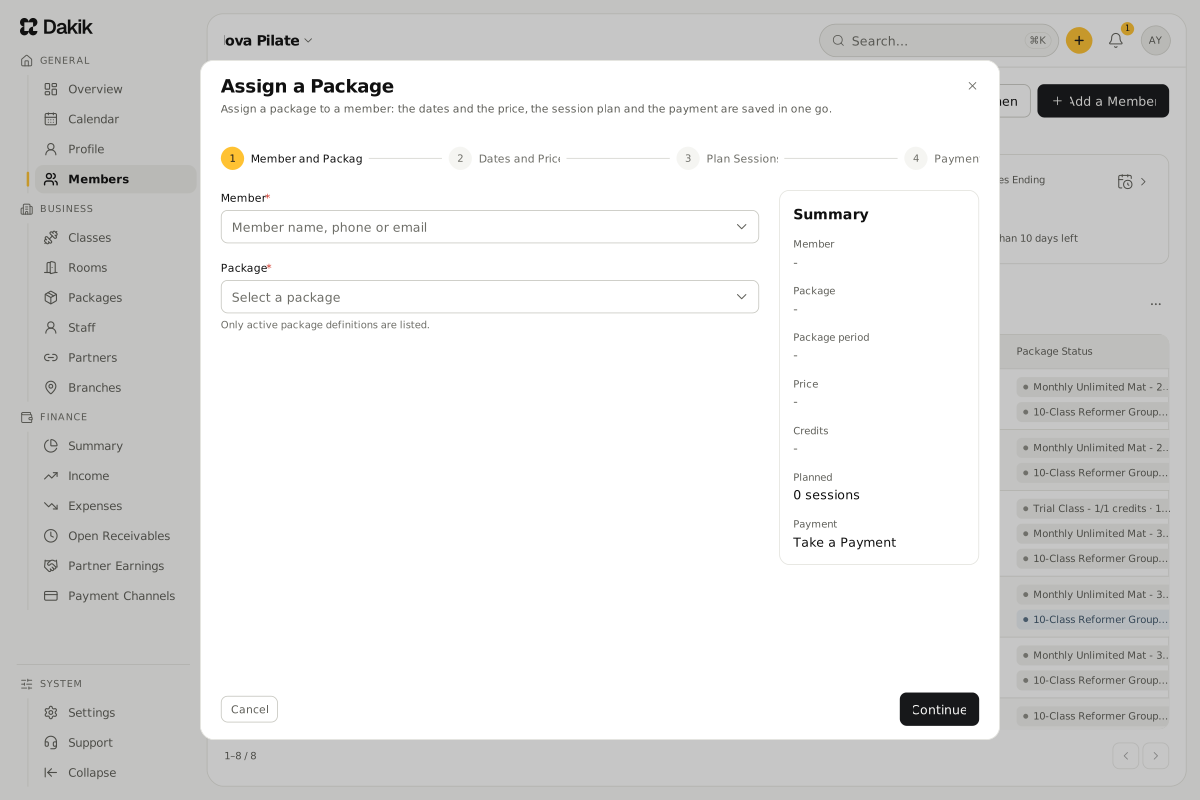
On the Members page, choose Assign a Package from the member's row menu or from their member page.
The Assign a Package window opens with the member filled in.
On Member and Package, choose the Package and press Continue.
Only active packages are listed.
On Dates and Price, choose the Package Start Date.
The end date is worked out from the package validity.
If this member pays a different price, enter it as the Package Price, then press Continue.
On Plan Sessions, pick the sessions the member will attend, or leave it empty and press Continue.
A credit is taken from the package for each session you pick.
On Payment, choose how they pay (see below).
Press Assign and Save the Package.
A "The package was assigned" summary opens: credits left, validity, bookings created and the payment.
Which payment option should I choose?
- Take a Payment: records the payment now. If the Payment Amount is less than the price, the rest is recorded as debt and split into installments.
- Record as Debt: nothing is paid today. The amount is split evenly over the Installments; the first is due today and the last on the Final Due Date.
- Partner Card: for a member who comes with a partner card such as MultiSport. The package price does not apply; the partner pays a visit fee for each class.
If the member was booked before they had a package
A member without a package who is added to a session is held as Awaiting Package. When you give them a package, those bookings that the package covers turn into reservations on their own, and the credits come off the package.
Classes the member already attended without a package are taken from the new package too. The Plan Sessions step shows in advance how many will be converted.
Can a trial package be given twice?
The same trial package can be given to a member only once. Users with the Staff role cannot get past this rule. See Trial packages.
Was this article helpful?
In this section
Didn't find what you were looking for?
Write to our support team; we answer on working days.